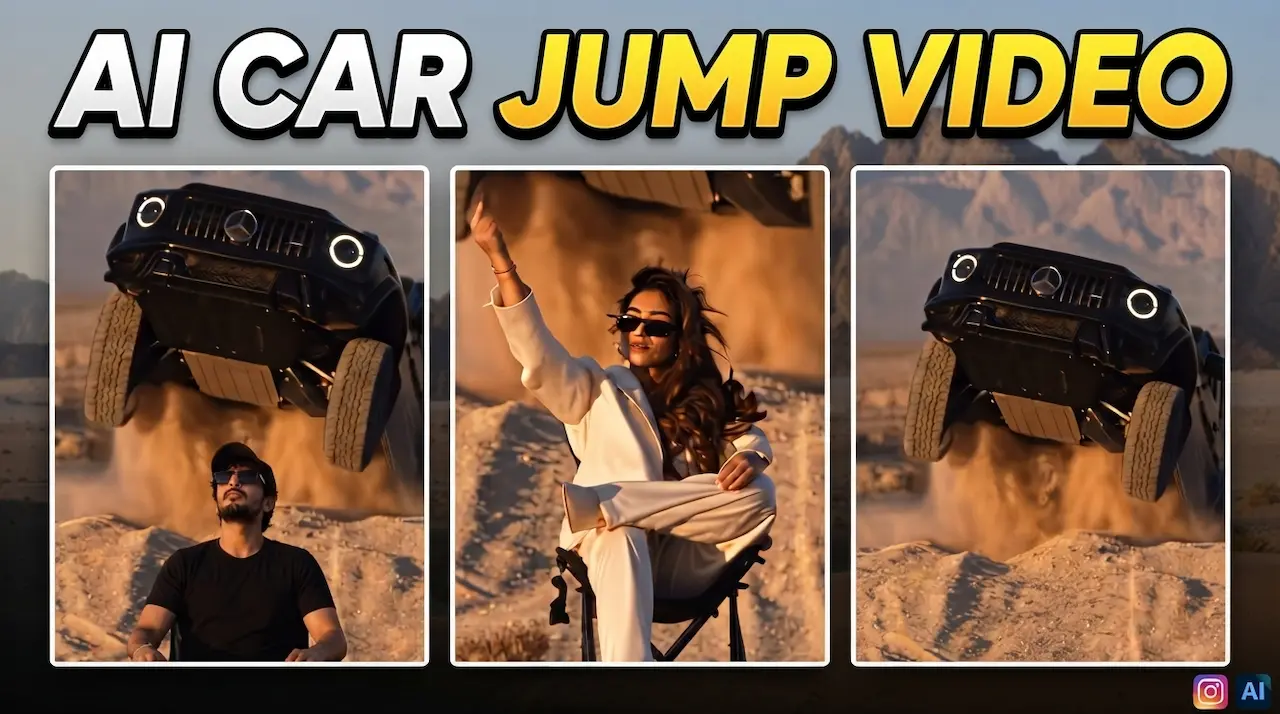
Create Viral AI Car Jump Video editing. Make trending G-Wagon flying over you video using AI. New Instagram AI trend tutorial with prompts.
Viral AI Car Jump Video Trend
The Viral AI Car Jump Video is currently dominating Instagram Reels, TikTok, and YouTube Shorts in 2026. In this amazing trend, a luxury Black G-Wagon appears to fly and jump directly over a person sitting calmly on a chair. It looks extremely realistic and cinematic. Millions of creators are getting millions of views with this simple effect. The best part is that you do not need any professional editing skills or expensive software. You can create this Hollywood-level stunt video using just one photo and an AI video generator tool. This tutorial will give you a complete step-by-step guide.
The G-Wagon Flying Over You video is a creative Viral AI generated illusion. The concept is simple but powerful. A person is sitting on a chair in an open area like a road or desert. Suddenly, a black Mercedes G-Wagon comes from behind at high speed, jumps into the air, and flies perfectly over the person’s head. The camera angle stays low and dramatic, making the jump look very real. The person remains calm, which adds to the thrill. This video is made using AI image-to-video tools that understand physics and motion. No real car or stunt is needed.

AI Trend is Going Viral on Instagram
This trend is going Viral AI for three main reasons. First, the visual shock value is huge. A giant SUV flying over a person is not something we see daily. Second, it features the G-Wagon, which is a symbol of luxury and power, making it more attractive. Third, the video is very short, 5 to 6 seconds, which is perfect for the Instagram algorithm and audience retention. People watch it again and again. Also, it is very easy to make. Anyone can recreate it, which creates a chain reaction. Brands and influencers are also using this trend to gain followers fast.
Before you start editing, you need to prepare a few things. You only need one clear photo of yourself. Make sure the photo is taken outdoors with good lighting. Sit on a simple chair in the middle of a road, parking lot, or empty ground. The camera should be placed on the ground at a low angle, pointing slightly upwards. Your full body and the chair should be visible. Wear casual clothes. Do not wear a cap. The background should be clean without too many people or cars. This clean photo will help the Viral AI Trend generate a perfect and realistic jump video.

Best Viral AI to Create This Video
You can create this video using several powerful Viral AI tools available in 2026. The most popular tools for this trend are Kling AI, Runway Gen-3, Luma Dream Machine, and Hailuo AI. Kling AI is currently the best for realistic car physics and motion. All these tools work on an image-to-video principle. You upload your photo, write a prompt, and the AI generates the video. Most of these tools offer free credits for new users. For best results, we recommend using Kling AI Pro version. It gives you ultra-realistic motion, dust effects, and tire smoke that makes the video look 100 percent real.
The prompt is the most important part of this editing. A wrong prompt will give you a bad result. We have tested many prompts and found the best one for you. Copy and paste this exact prompt into your AI tool. Here is the main prompt: “A black Mercedes G-Wagon SUV is flying and jumping high over a person sitting on a chair in the middle of the road, cinematic low angle shot, super realistic, dust and motion blur, 4K, slow motion landing.” You can also add negative prompts like “no distorted face, no extra legs, no cartoon”. This prompt tells the AI exactly what to do.
Using CapCut Viral AITemplate
Here is the full step-by-step process to create your video. First of all, go to Kling AI website and login. Secondly, select the Image to Video option. After that, upload the photo you took sitting on the chair. Next, paste the viral prompt we gave you above. Then, set the creativity to 0.8 and duration to 5 seconds. Furthermore, select the 16:9 aspect ratio for YouTube or 9:16 for Reels. Afterwards, click on the Generate button. Meanwhile, the AI will take about 2 to 3 minutes to generate your video. Once done, preview it and download it in high quality. Finally, your viral video is now ready.
PromPt: A black Mercedes G-Wagon SUV jumping high in the air and flying directly over a person sitting calmly on a chair in the desert, low angle cinematic shot, front view of the car in mid-air, realistic dust and sand particles in air, motion blur, tires visible, golden hour sunset lighting, ultra realistic, 4K, slow motion, highly detailed
Generate Video
Make Your Video Look 100% Realistic
If you want your Viral AI video to look ultra-realistic, then follow these pro tips. First of all, add a subtle camera shake in post-editing. Because of this, it will feel like it was shot on a real camera. Secondly, add a sound effect of a powerful car engine and whoosh sound when the car flies. For this purpose, you can get these sounds from YouTube Audio Library. Thirdly, add dust particles flying when the car lands. Finally, color grade your video with a cinematic filter. For example, increase contrast slightly and add a warm tone. In conclusion, these small details will separate your video from others and will make people think it is a real Hollywood stunt.
Many beginners make some common mistakes that ruin their video. The first mistake is using a blurry or indoor photo. Always use a high-quality outdoor photo. The second mistake is writing a very long and confusing prompt. Keep the prompt simple and clear as we provided. The third mistake is sitting too close to the camera. Keep at least 10 feet distance. The fourth mistake is generating video in low resolution. Always generate in 1080p or 4K. Avoid using too many effects after generation. The Viral AI already adds natural motion blur and dust. Do not over-edit it or it will look fake.
Other Car Variations You Can Try
Once you master the G-Wagon trend, you can try other luxury cars to make your content unique. Instead of G-Wagon, you can use a Lamborghini Urus, Range Rover, Tesla Cybertruck, or even a Formula 1 car. Just change the car name in the prompt. For example, “A red Lamborghini Urus jumping over a person…”. You can also change the scene. Try a sports bike jumping, a monster truck jumping, or a lowrider. Trying new variations will help you stand out from the crowd. People are bored of seeing only G-Wagon, so new car variations can make you go viral again.
You can easily monetize this Viral AI trend in multiple ways. First of all, you can create these videos for other people and charge $10 to $20 per video on Fiverr and Instagram. In fact, many influencers are actively paying for this service. Secondly, you can create a YouTube channel and post tutorials like this one. As a result, you will get high views and AdSense revenue. Furthermore, you can sell a prompt pack of 50+ car jump prompts. Moreover, you can use this trend to grow your own page and then do brand promotions. Therefore, this simple AI skill can easily become a full-time freelancing business for you in 2026.


