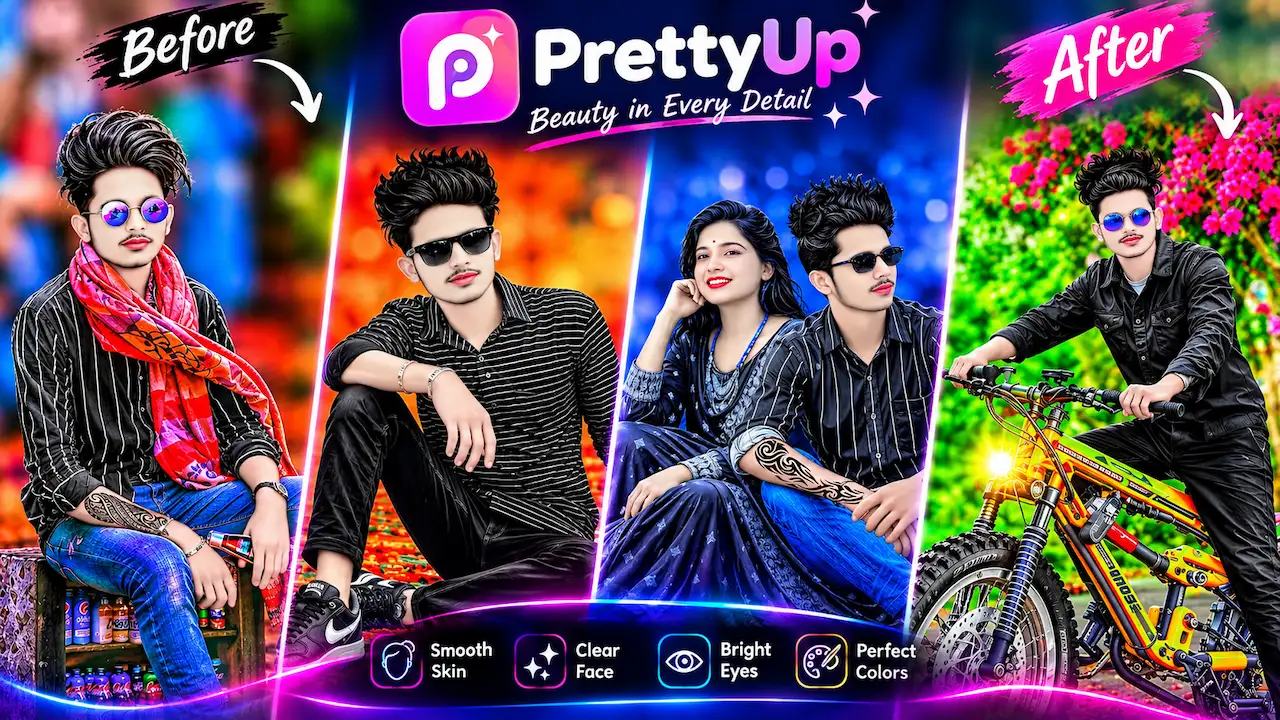
Discover PrettyUp App, an AI photo editor for smooth skin, clear face, bright eyes and perfect colors. Learn how to enhance photo quality with beauty feature.
PrettyUp – Beauty in Every Detail
PrettyUp is an innovative beauty camera and photo editor that stands out with its slogan Beauty in Every Detail. The app is developed to provide natural looking enhancements rather than artificial filters. It analyzes your photos and applies smart retouching to make your pictures look more attractive. The application is completely safe and official, focusing on providing high quality editing tools. Users can transform ordinary photos into studio like portraits. It supports high resolution image processing without losing quality. The app is regularly updated with new features and improved AI technology to give the best results for all skin tones and lighting conditions.
PrettyUp App is a powerful AI based photo editing application designed to enhance photo quality with professional beauty features. It helps users to achieve smooth skin, clear face, bright eyes and perfect colors with just one tap. The app uses advanced artificial intelligence to detect facial features and improve every detail naturally. Unlike complex editing software, PrettyUp offers a simple and user friendly interface for beginners. It is available on the official Google Play Store for Android users. This app is perfect for those who want to improve their portraits, selfies and overall photography without any technical skills. It focuses on beauty in every detail.

Key Features Overview of PrettyUp App
The PrettyUp App comes with a wide range of amazing features that make it a complete photo editing solution. The main highlights include Smooth Skin which removes blemishes and gives a silky texture, Clear Face which enhances facial clarity, Bright Eyes which makes eyes more attractive, and Perfect Colors which balances the color tone of the entire image. Additionally it offers AI background changer, body shape editor, makeup tools and hairstyle try on. All features are designed to work automatically with manual adjustment options. The app ensures that the final result looks natural and professional for social media sharing.
The Smooth Skin feature is one of the most popular tools in the PrettyUp App. It uses AI to automatically detect skin imperfections such as acne, dark spots, wrinkles and rough texture. With one click it smooths the skin while preserving the natural skin texture, so the photo does not look fake. Users can control the intensity level from low to high according to their preference. This feature is very useful for portrait and selfie photos. It saves a lot of time compared to manual retouching in Photoshop. The algorithm works equally well for all genders and ages, providing a flawless but realistic skin finish that enhances confidence.

Clear Face Technology for HD Results
Clear Face is an advanced AI enhancement that improves the overall clarity and sharpness of the face in a photo. Often photos appear blurry due to low light or camera quality, this feature fixes it instantly. It sharpens facial features, improves details and makes the face look more defined and clean. The technology also reduces noise and grain from the picture. This is especially helpful for old photos or low quality images captured in poor lighting. The result is a high definition clear face that looks professional. It does not over edit and maintains the original identity of the person in the photo.
Eyes are the most important part of any portrait and the Bright Eyes feature of PrettyUp makes them stand out. This tool automatically brightens the eyes, enhances the eye color and adds a natural sparkle. It also removes red eyes and dark circles that often appear in photos. Users can make eyes look bigger and more expressive with subtle adjustments. The AI ensures that both eyes are balanced and symmetrical. This feature is perfect for creating captivating profile pictures for Instagram, Facebook and other social platforms. The brightening effect is natural and avoids the artificial plastic look common in other beauty apps.
Perfect Colors and Tone Adjustment
The Perfect Colors feature automatically corrects the color balance, brightness, contrast and saturation of your entire photo. Many photos suffer from dull colors or incorrect white balance, this tool fixes it with AI. It makes the background more vibrant, like the greenery and flowers shown in the after result, while keeping skin tones natural. The app analyzes the scene and applies the best color grading. Users can also manually fine tune the colors if needed. This feature turns a normal photo into a visually stunning image that looks like it was taken by a professional photographer with a high end camera.
The most impressive aspect of PrettyUp is its realistic before and after transformation as shown in the thumbnail. The Before image shows a normal photo with average lighting and colors, while the After image shows a highly enhanced version with improved background, clearer outfit details and better facial glow. The transformation is not just about face editing but complete photo enhancement. The app can change dull backgrounds into beautiful colorful scenes, improve clothing textures and add professional lighting effects. This complete makeover capability makes PrettyUp different from other simple filter apps and provides a full studio like editing experience.
CLICK HERE
PrettyUp App Safe and Official
Using PrettyUp App is very simple and does not require any editing experience. First download the official app from Google Play Store and install it. Open the app and select a photo from your gallery or take a new selfie. The AI will automatically scan your face and show you all the enhancement options. You can start with auto enhance which applies all four main features at once. After that you can manually adjust smooth skin, clear face, bright eyes and perfect colors sliders. Once you are satisfied with the preview, click on save. The edited photo will be saved in high quality in your gallery ready to share.
Yes, PrettyUp App is 100% safe and official to use. It is available on the Google Play Store and follows all privacy and security guidelines. The app does not collect unnecessary personal data and all photo processing is done securely. It does not require any suspicious permissions. Unlike modded versions available on third party sites, the official version is free from viruses and malware. For the best and safest experience, always download the app from the official store. The official version also gets regular updates, bug fixes and new AI improvements which make it more stable and reliable for long term use.
Who Should Use PrettyUp Photo Editor
PrettyUp is ideal for a wide range of users including social media influencers, content creators, students, models and anyone who loves photography. If you regularly post on Instagram, TikTok, Facebook or Snapchat, this app will help you create eye catching profile pictures. It is also useful for professionals who need to enhance their LinkedIn or portfolio photos. Even casual users who want to improve family photos or old pictures will find it very helpful. The app is lightweight and works smoothly on most Android devices without lag. It is a must have tool for anyone who wants beauty in every detail without spending money on professional editors.
Compared to other popular photo editors like PicsArt, BeautyPlus or Remini, PrettyUp offers more natural and balanced results. While many apps over edit and make skin look plastic, PrettyUp maintains a realistic look. Its AI is more accurate in detecting facial features and its background enhancement is superior. The interface is also simpler than complex apps. Most importantly, PrettyUp focuses specifically on portrait beauty enhancement, making it an expert in this category. Other apps offer hundreds of unrelated features which can be confusing, but PrettyUp keeps it simple with four core pillars that deliver professional results quickly and efficiently for everyday users.


