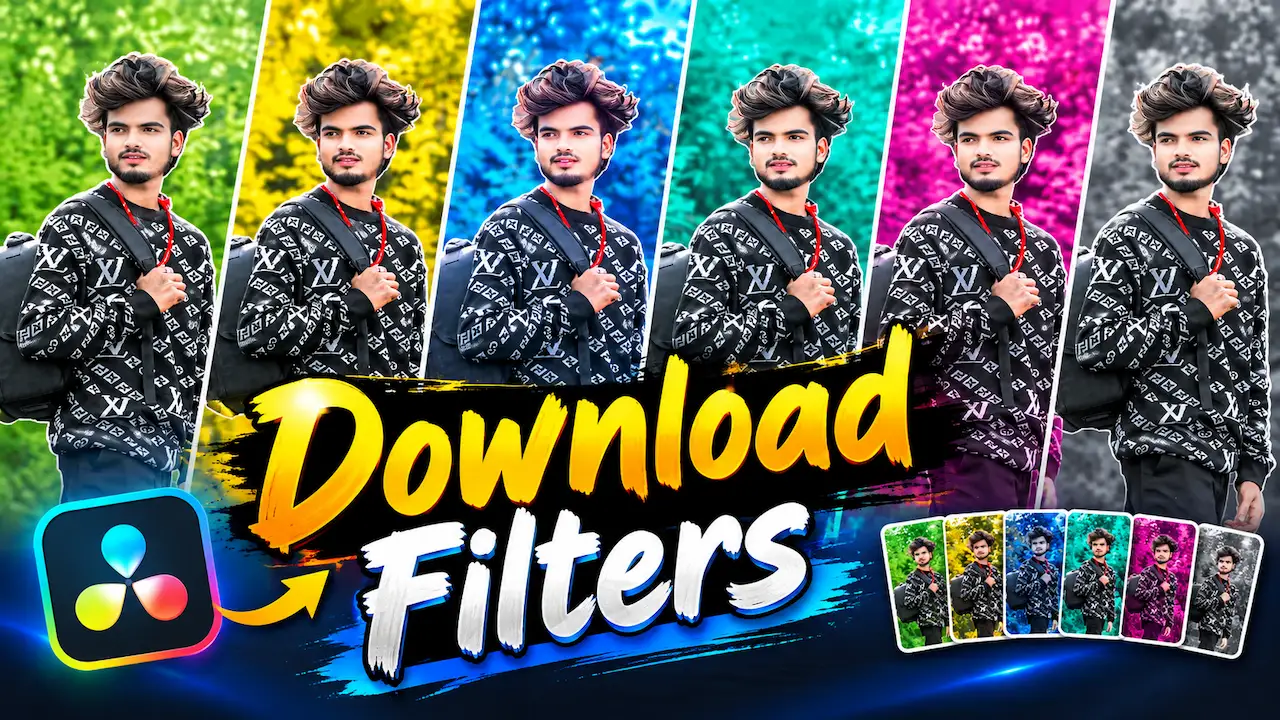
I am sharing the most popular colorful filters pack for DaVinci Resolve photo editing. You can Download viral filters for free and use them in your photos.
Colorful Filters Are So Popular Today
Colorful filters are trending on Instagram, TikTok, and YouTube because they instantly make any normal photo look cinematic. People love green, yellow, blue, and pink tones because they give a fresh and aesthetic look. In 2026, the demand for ready-made filters is very high because not everyone knows advanced color grading. These most popular filters save your time and give you a professional result. Instead of adjusting curves and wheels manually, you just apply the filter. That is why this pack is getting viral and every new editor wants to download it for free.
I am sharing the most popular colorful filters pack for DaVinci Resolve photo editing. This pack is specially designed for creators who want to make their photos look more professional and attractive. DaVinci Resolve is not only for video editing but also very powerful for photo color grading. With these viral filters, you can change the mood of your photo in just one click. These filters are inspired by current social media trends and are used by many famous editors. You can download them for free and use them for your personal and commercial projects without any copyright issue.

Features of Green Nature Filter Download
The Green Nature Filter is the most popular filter in this pack. It enhances the green color in your photos and makes trees, grass, and plants look more fresh and vibrant. This filter is best for those who shoot nature, village, forest, or garden photos. It increases saturation of green without damaging skin tones. Many creators use this filter for their vlog thumbnails and Instagram posts. In DaVinci Resolve, this filter is made with careful color balance. You can download this filter for free and apply it to make your nature photos more eye-catching and natural looking for your audience.
This free filter pack includes six most demanded filters that are currently viral. First is the Green Nature Filter which is perfect for outdoor photos. Second is the Yellow Warm Filter which gives a sunny and happy look. Third is the Blue Cold Filter for a cool cinematic mood. Fourth is the Aqua Tone Filter which is very popular for travel photos. Fifth is the Pink Soft Filter for aesthetic and Instagram style photos. Sixth is the Black and White Classic Filter for a timeless and professional look for your portfolio.

Features of Yellow Warm Filter
The Yellow Warm Filter gives a warm, sunny, and happy feeling to your photos. It is perfect for evening photos, wedding photos, and street photography. This filter adds a slight golden touch which makes the photo look like it was taken during golden hour. It is one of the most viral filters on social media because it makes skin tones look glowing. If your photo looks dull and dark, this filter will instantly make it bright and warm. You can use this filter in DaVinci Resolve for free and make your photos more attractive and professional with one click.
The Blue Cold Filter is for creators who love cinematic and moody looks. This filter adds a cool blue tone to your photos and makes them look like a movie scene. It is very popular for night photos, urban photography, and fashion shoots. This filter reduces warm colors and highlights blue and teal colors. Many famous music video editors use this type of filter. If you want your photos to look more stylish and modern, this blue filter is perfect for you. You can download it for free and use it in DaVinci Resolve for your next photo editing project easily.
Features of Pink Soft Filter Download
The Pink Soft Filter is the favorite filter for girls and aesthetic photo lovers. It adds a soft pink tone to your photos and makes them look cute, dreamy, and lovely. This filter is perfect for selfies, makeup photos, and Instagram feed. It makes skin look smooth and adds a romantic mood. This filter is viral on TikTok and Instagram reels. If you want your photos to look soft and attractive, you should try this pink filter. You can download this filter for free for DaVinci Resolve and use it to create stunning aesthetic photos that will get more likes and followers.
Download Filters
The Aqua Tone Filter is currently trending for travel and beach photos. It gives a beautiful aqua and turquoise color to water and sky. If you have photos from sea, river, or swimming pool, this filter will make them look amazing. This filter is also used for summer vacation photos because it makes the scene look cool and refreshing. In DaVinci Resolve, we have created this filter with balanced color grading so it does not look over-edited. You can download this viral aqua filter for free and make your travel photos more beautiful and professional for social media sharing.
Download These Filters For Free
You can download this most popular filters pack for free from the link given in the description and first comment. We have uploaded the pack on Google Drive for easy and fast download. The file size is very small and it is in .cube and .setting format which is fully supported by DaVinci Resolve. No password is needed to extract the file. Just click on the download link, and the download will start automatically. This pack is completely free for all users and there is no watermark. You can use it for unlimited projects without paying any money.
The Black and White Classic Filter is timeless and never goes out of trend. In fact, this filter removes all colors and gives your photo a powerful and emotional black and white look. Moreover, it is best for portrait photography, street photography, and artistic photos. Additionally, this filter highlights shadows and details more clearly. For this reason, many professional photographers use black and white filters to show emotions. Furthermore, in this pack, our black and white filter is specially optimized for DaVinci Resolve to keep high contrast and sharpness. Finally, you can download it for free and give your photos a classic and professional touch that looks premium.
Install Filters in Download DaVinci Resolve
Installing these filters in DaVinci Resolve is very easy. First, open DaVinci Resolve and go to the Color page. Then right-click on the LUTs folder and select open file location. Now copy all the downloaded filter files and paste them into the LUT folder. After that, click on update lists in DaVinci Resolve. Now restart your DaVinci Resolve software. You will find all six filters in your LUTs list. Just drag and drop any filter on your photo node and adjust the intensity. Your photo will be color graded instantly with a viral and professional look.
To get the best results with these filters, you should follow some simple tips. First of all, always adjust exposure and white balance before applying any filter. Secondly, do not apply filter at 100% intensity because it can look too strong. Therefore, keep it between 70% to 80% for a natural look. Moreover, after applying the filter, slightly adjust contrast and saturation. Furthermore, use these filters according to your photo mood. For example, use a warm filter for sunset and a cold filter for night. Finally, these small tips will help you make your photos look more professional and not over-edited.


