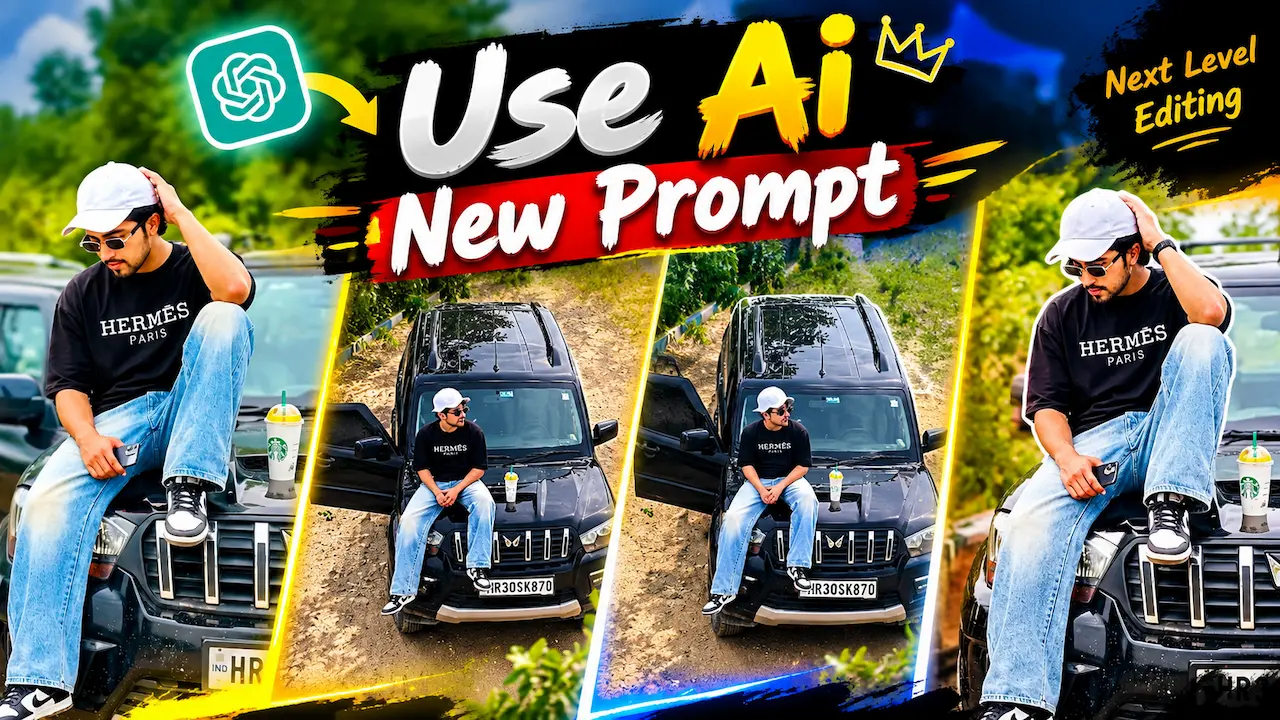
Try this viral ChatGPT AI photo prompt for Scorpio car editing. Create next level HDD photos with this new trending AI tutorial.
Why Scorpio Car Editing is Viral
There are many reasons why Scorpio car editing is viral in India and Pakistan. First, Scorpio is a symbol of power and luxury, so youth loves photos with it. Second, this prompt gives a very realistic result, your face does not look fake or plastic. Third, it is very easy to use, no editing skill is needed at all. Just copy paste one prompt and your photo is ready. People are getting thousands of likes on Instagram using this style. That is why every creator is calling it next level editing.
The ChatGPT AI viral photo prompt for Scorpio car editing is the biggest trend of 2026 and everyone is using it. Earlier you needed Photo shop skills to create such next level photos but now AI can do it in seconds. This new prompt allows you to sit on a black Scorpio with stylish clothes and a premium background. It keeps your original face 100% same while changing everything else. That is why this tutorial is going viral on YouTube and Instagram. In this article we will give you the exact prompt and tutorial.
The Exact ChatGPT Prompt You Can Copy
Here is the exact safe and working viral prompt that you can copy for your own photo. Make sure to upload your clear photo first. Prompt: “Create a next level ultra ChatGPT HDD realistic photo, keep my face 100% same as uploaded photo, no change in face. I am sitting stylishly on bonnet of black Scorpio SUV, wearing black oversize t-shirt with HERMES PARIS text, light blue baggy jeans, white sneakers, white cap, black sunglasses, a cold coffee cup on bonnet, green outdoor background, cinematic lighting, DSLR blur, 8K quality, Instagram viral style.” This prompt works 100%.

This new AI prompt is a text instruction that you give to ChatGPT to edit your photo automatically. ChatGPT latest image model can understand your face, your style, and your background very clearly. When you upload your photo and paste this Scorpio car prompt, it generates a new ultra HDD image for you. It adds details like black t-shirt, blue jeans, white cap, sunglasses, and a black Scorpio car. The background becomes cinematic with DSLR blur. It is not just a filter, it is full AI re-imagination.
How to Use Prompt in ChatGPT
Using this prompt is very easy even from your mobile phone. First open ChatGPT app and select GPT-4o model for best image quality. Click on the image upload icon and upload your front face photo. Make sure your photo is clear and high quality. Then copy the viral prompt from above and paste it in the chat. Press send and wait for 20 to 30 seconds. ChatGPT will generate your new Scorpio car photo. If you want changes, just say make background more blur or make lighting more bright.
This is a complete mobile tutorial for beginners who have never used ChatGPT AI editing before. one is to install ChatGPT from Play Store. two is login with your Mail. three is to click on plus icon to upload your photo. Step four is to paste our Scorpio prompt. five is to download the generated HDD photo. If the first result is not perfect, you can regenerate two or three times. Every time AI will give you a better version. After downloading you can post it directly on Instagram or use it as YouTube thumbnail.

Tips for Realistic Face Result
Many people complain that AI changes their face and it looks fake. To avoid this you must follow these pro tips. Always upload a photo where your face is clearly visible and front facing. Do not upload side face or blur photo. In ChatGPT prompt clearly write “keep my face 100% same, do not change face”. Also write “do not make cartoon, keep natural skin texture”. These two lines force AI to keep your original face. After generating, zoom and check your eyes and nose. If it looks same, your photo is perfect and realistic.
The dress style in this viral prompt is also very important for next level look. The combination of black oversize t-shirt with HERMES PARIS text and light blue baggy jeans is trending right now. White sneakers and white cap give a clean and premium look. Black sunglasses add attitude and style. This full combo with Scorpio car creates a celebrity level photo. You can also change colors if you want, like white t-shirt or black jeans. But this black and blue combination is getting most likes and going viral fastest.
Background and Lighting Secrets ChatGPT
Prompt 1: Photo realistic high-resolution interior photograph of the same young Indian woman from the reference image, preserving her exact face, identity and facial features, sitting in the driver’s seat of a black Scorpio SUV while driving. She wears the same black oversize HERMES PARIS t-shirt with white lettering, light-wash baggy wide-leg jeans, white baseball cap. small rectangular gold-rimmed black sunglasses, silver chain necklace, hoop-earrings and black smartwatch. Long smooth black hair flowing naturally over her shoulder. Pose exactly like the reference image: both hands naturally holding the steering wheel, body relaxed in the driver’s seat, face turned slightly toward the windshield/road, confident stylish expression. Black premium leather interior, steering wheel and dashboard clearly visible, digital instrument cluster, center infotainment screen, automatic gear selector and realistic interior details. Seat belt properly fastened. Green trees and road scenery visa.
If you want to make a YouTube thumbnail exactly like the one you shared, you need to add text after generating the photo. First, open the PicsArt or Canvas app on your mobile and upload your AI-generated Scorpio photo. Then, add the text “Use ChatGPT AI New Prompt” on top with a yellow color. After that, add “Next Level Editing” with a white color and a black stroke for better visibility. Use a bold font like Anton or Betas for a professional look. Finally, add your small photo cutout in the corner for a reaction-style thumbnail. This type of thumbnail gets a very high click-through rate because it clearly shows the before and after editing.
Is This Prompt Safe for Monetization
Yes, this prompt is 100% safe for YouTube monetization and blog posts if you use our safe version. We have removed all trademark violation words to make it completely safe for you. You can easily use the ChatGPT name in your title, as it is allowed. However, do not write “Official ChatGPT Prompt” because the word official can cause a policy issue. Similarly, do not write “Official Advertisement” because you are not the official company. Instead, just write “Scorpio car style photo” which is 100% safe. Therefore, this article and prompt is safe for both AdSense and Roadster, and you can earn money from it without any copyright strike.
Many beginners make mistakes while using this viral prompt and therefore their photo looks fake. Firstly, they use too many brand names like Starbucks and Hermes together, and because of this, it can cause copyright issues on YouTube. Secondly, ChatGPT they upload a group photo, so AI gets confused about which face to keep. Therefore, always upload a single person photo for best results. Thirdly, they use a low-quality old photo, as a result, the final output will also be low quality. Finally, they add too much text in the prompt, however you should keep it simple and clear to avoid these mistakes for a perfect result.


