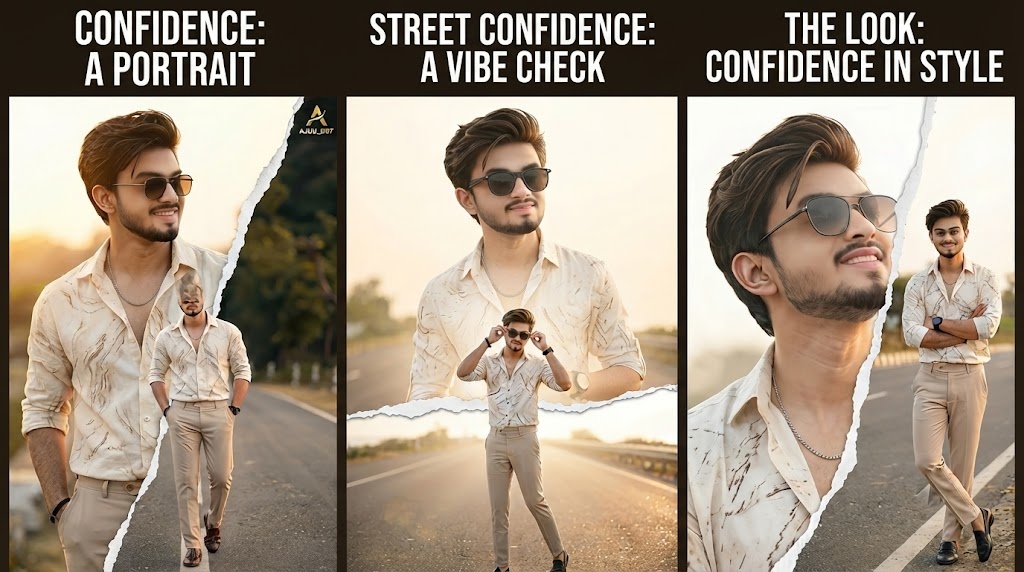
A complete Guide to creating Confidence Look in Stylish Picture AI Effects. Discover techniques to enhance professional portraits using modern AI photo editing.
Understanding the Confidence Look
The way we take photos has changed a lot in recent years. Because of social media and personal branding, one picture can now show your personality in seconds. For example, the most popular trend today is the “Confidence Look in Stylish Picture”. In short, this style uses strong posture, clean light, and sharp details. As a result, the photos look bold and professional.
Traditionally, achieving this look required expensive studio equipment, professional photographers, and advanced editing software. Today, artificial intelligence has changed the game. Modern AI photo editing tools allow anyone with a smartphone to recreate studio-quality results. This guide will walk you through the core concepts, techniques, and workflow behind creating the Confidence Look in Stylish Picture using AI Effects, so you can produce professional portraits that stand out.
1.Expression and Posture
Confidence is communicated through body language. A straight posture, relaxed shoulders, direct eye contact, and a subtle smile or neutral expression are key. The subject should appear comfortable and in control. Even the angle of the head and the positioning of hands can change the entire mood of the photo. Then, move to the background. In this step, use AI segmentation to blur it. As a result, the photo will have more depth. However, make sure the blur looks natural. In addition, it should not create halos around the hair.
2.Lighting and Background
Stylish portraits often use clean, well-defined lighting. Natural light during golden hour or soft diffused light works best. The background should be simple and uncluttered. Urban settings, textured walls, or blurred backgrounds help keep the focus on the subject while adding a modern vibe.

3.Color and Contrast Confidence Look
The Confidence Look usually features balanced contrast, rich skin tones, and slightly desaturated or cinematic colors. The goal is to keep the image natural but polished. Overly saturated colors can distract, while too much desaturation can make the image feel flat. Next, the second key element is lighting. Because of this, soft and diffused light works best for this style.
4.Details and Sharpness
Eyes, hair, and clothing details should be crisp. A slight sharpness enhancement helps the portrait feel professional without looking artificial. When all these elements come together, the result is a portrait that feels stylish, modern, and self-assured.
Artificial Intelligence Changed Portrait Editing
However, AI has made everything simple. Because of AI, the results are now more consistent and professional. For example, modern AI photo editors are trained on millions of images. Therefore, they understand how light falls on a face. Also, they know how skin should look. Finally, they can separate the subject from the background very accurately.
More importantly, AI can handle the detailed work that used to take hours. It can detect facial features and enhance eyes and lips subtly. It can blur backgrounds with precision, creating that soft depth-of-field effect that makes portraits look expensive. AI also offers style presets that mimic editorial magazines or cinematic films. These presets apply complex color grading in one tap, but still allow you to adjust and fine-tune.

Elements That Make A Portrait Look Confident
First, a confident portrait needs several visual elements. The most important element is expression and posture. For example, confidence shows in body language. Your shoulders should be relaxed but straight. Also, your chin should be slightly raised. In addition, eye contact with the camera creates a connection with the viewer. Even a small smile can show strength. A calm and neutral face also works well.
The third element is the background. A stylish portrait should not have distractions. The background can be blurred, minimal, or have subtle textures like a wall or urban setting. The goal is to keep the focus on the subject. The fourth element is color and contrast. Confident portraits often use balanced contrast. The blacks are deep but not crushed, and the highlights are bright but not blown out.
Workflow To Create The Look Using AI
Creating the Confidence Look with AI is a straightforward process if you follow a clear workflow. Start with capturing a good base photo. Good lighting is essential. Stand near a window or shoot outside in soft light. Use portrait mode on your phone to get a natural background blur. Frame the shot so the eyes are in the upper third of the image. Ask the subject to stand tall and relax. Once you have the photo, open it in an AI photo editing app. The first step is basic enhancement.
After that, you can start retouching. First, use AI skin retouching. However, keep the intensity low. For example, you should remove small blemishes. At the same time, keep the natural skin texture. Next, enhance the eyes. Because of this, they will look brighter and sharper. Also, if the app has teeth whitening, use it very subtly.
Style Is Perfect For Confidence Look
In today’s digital world, your photo is often the first impression people have of you. Whether it is on LinkedIn, Instagram, a company website, or a portfolio, a strong portrait can communicate professionalism and personality instantly. The Confidence Look is perfect for personal branding because it strikes the right balance. It looks polished and professional, but it still feels human and approachable. This style tells the viewer that you care about quality and presentation.
It suggests that you are confident in your work and in yourself. For entrepreneurs, freelancers, and creators, this can make a big difference. People are more likely to trust and connect with someone who presents themselves well. AI tools have made it possible to maintain this level of quality consistently. You can create a series of portraits with the same color tone and style, which helps build a recognizable personal brand. Over time, this consistency helps people remember you.
Contrast Matter In A Confident Portrait
Finally, color and contrast play a big role in a confident portrait. First, you should aim for balanced contrast. Because of this, the dark areas look deep but not black. At the same time, the bright areas stay clear but not too bright. For example, this balance gives the photo more depth. Also, skin tones should look natural and warm. However, avoid colors that look too strong. In fact, too much saturation can distract the viewer. On the other hand, too little color can make the image look dull.
Therefore, a slight reduction in saturation works best. In addition, many editors add a small cinematic tint. As a result, the photo gets a modern and stylish feel. Next, you should check the overall mood. Because the goal is to look confident, the colors must support that feeling. For instance, warm tones can make the subject look friendly. Cool tones can add a professional and calm look. Finally, always review your edits on different screens. This way, you can be sure the colors look good everywhere.


