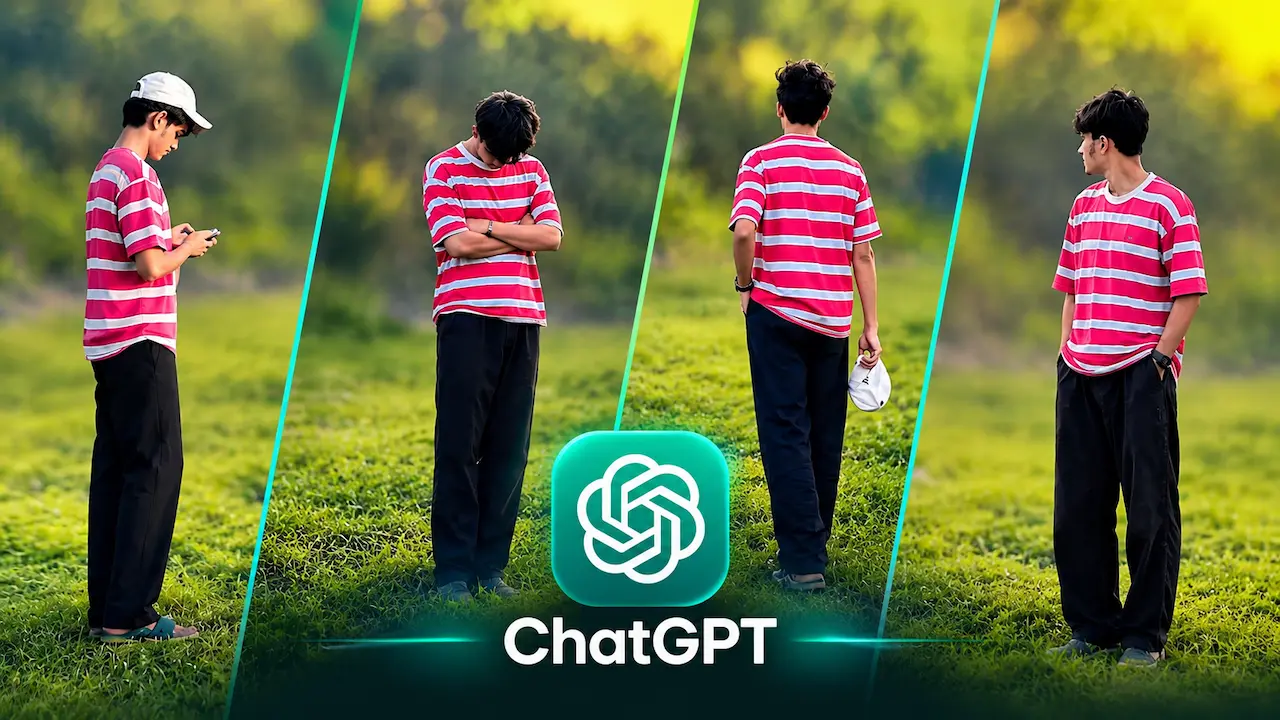
Want the viral Cinematic photo? Get the best ChatGPT prompt for cinematic pose different angles. Create poses in one frame with HD quality.
This Prompt is Going Viral in 2026
This prompt is viral because it is simple, emotional, and highly shareable. Young creators love it because it shows personality and loneliness in a cinematic way. The background is usually a green field during golden hour, which adds a natural, dreamy feel. ChatGPT has made it possible to generate this complex edit with just one prompt. People are using it for profile pictures, YouTube thumbnails, and Instagram posts. The hashtag #CinematicPrompt has millions of views. Everyone wants to try this 4-in-1 pose because it makes a normal photo look like a high-budget movie poster instantly.
Cinematic Pose Different Angles is a photo editing style where the same person is shown in multiple poses within one frame. Usually, the frame is split into four vertical sections, each showing a different angle or mood. For example, one side shows you looking at your phone, another with arms crossed, third from the back, and fourth looking sideways. This creates a cinematic storytelling effect. It is different from a normal collage because the lighting, background, and color grading remain consistent. The result looks like a professional film still, which is why it is going viral on TikTok and Instagram.

ChatGPT Prompt for Cinematic Pose
Here is the best and viral ChatGPT prompt to create this look. Copy this exact prompt. “Create a cinematic 4-panel image of the same young man in a striped pink and white t-shirt and black pants, standing in a lush green field during golden hour. Show four different angles: first looking at phone with white cap, second head down with arms crossed, third back view holding cap, fourth looking sideways with hand in pocket. Cinematic lighting, ultra HD, soft bokeh, consistent background, vertical split with neon glowing lines.” This prompt will give you the exact viral photo in HD quality.
Using this prompt is very easy. First, open ChatGPT and select the image generation model. Upload a clear front-facing photo of yourself. Then paste the viral prompt we gave you above. Make sure you mention your clothing and location if you want to customize it. Click generate and wait for 20-30 seconds. ChatGPT will create four different poses in one frame with HD quality. If the result is not perfect, you can refine it by saying “make lighting more cinematic” or “make background more green.” You can generate multiple variations until you get the perfect viral look.

HD Quality and Cinematic Lighting
The key to a viral cinematic photo is HD quality and lighting. Without good lighting, your photo will look like a normal collage. The prompt specifically asks for cinematic lighting, which means soft sunlight, warm tones, and shallow depth of field. Golden hour lighting is best because it creates a natural glow on the face and grass. HD quality ensures every detail like grass texture and clothing is sharp. When you use terms like ultra HD, 8K, and soft bokeh in your prompt, ChatGPT enhances the sharpness. This makes your final image look professional and ready for social media posting.
You can customize the four poses according to your style. For boys, popular poses are: looking at phone, arms crossed, back view, and side glance. For girls, you can try: hair flip, looking down, holding bag, and smiling sideways. The idea is to show four different emotions like lonely, thinking, confident, and calm. Make sure your body language is different in each panel. This storytelling aspect is what makes people stop scrolling. You can also add accessories like a cap, sunglasses, or watch to make each angle look unique and more cinematic.
Background Selection for Cinematic Effect
Background plays a huge role in cinematic photos. The most viral background is a lush green field with blurred trees and sunset light. This background is simple and does not distract from the main subject. You can also try other backgrounds like a city street at night, a beach during sunset, or an empty road. But keep the background same in all four panels for consistency. If the background changes, the cinematic effect will be lost. In your prompt, always write “consistent background, same location, seamless green field” to keep the AI focused on one environment only.
The 4-in-1 split is what makes this edit special. The image is divided by thin, glowing neon lines that are slightly diagonal. This diagonal split adds a modern, dynamic feel compared to straight vertical lines. When writing your prompt, mention “vertical split into four panels with thin cyan glowing lines, diagonal separation.” This tells ChatGPT to create the split effect. You can also ask for three panels or two panels, but four is the most viral. This split-screen technique is used in movies to show time progression, and that is why it feels so cinematic and professional.
Editing Tips After Generating the Photo
After you generate your photo from ChatGPT, you can enhance it further. Use apps like Lightroom or Snapseed to increase contrast, sharpness, and saturation. Add a slight vignette to make the center more focused. You can also increase the glow of the split lines using Picsart. If you want to add a logo like ChatGPT, you can do it in Canva. Make sure to export in HD quality, at least 1080×1920 for stories and reels. Good post-editing will make your photo stand out even more and get more likes and shares on social media.
Many people ask why use ChatGPT when there are many editing apps. The reason is simple: ChatGPT can generate all four angles from just one photo. Other apps like Picsart or Photoshop require you to take four separate photos and manually merge them. That takes time and skill. ChatGPT does it automatically with AI, keeping face, clothing, and lighting consistent. It also understands cinematic terms better. You do not need to learn complex editing. Just paste the prompt and get a studio-quality result in seconds. This ease of use is why ChatGPT is the best tool for this viral trend.
Make This Photo Viral on TikTok
To make your cinematic photo viral on TikTok, you need the right strategy. Post your final 4-in-1 photo as a slideshow with emotional music. Use trending audio like sad or motivational songs. Add text on video like “POV: 4 moods in one day.” Use hashtags like #cinematicprompt, #chatgptprompt, #viralphotoediting, #4poses, #aesthetic. Post at peak times like 7 PM to 9 PM. Also, share the prompt in comments to get more engagement. People love to try new prompts, so if you share the prompt, your video will get more saves and shares, which boosts virality quickly.
If you want to try different styles, here are some alternative prompts. For a dark moody look, add “dark cinematic, rainy weather, moody tones. happy vibe, add “bright sunlight, smiling, vibrant colors.” For a street style, add “urban street background, night lights, streetwear outfit.” You can also change the number of panels to 2 or 3. The main structure remains same, just change the mood words. Experimenting with different styles will help you find your unique aesthetic. This keeps your content fresh and helps you create multiple viral photos with the same technique.


